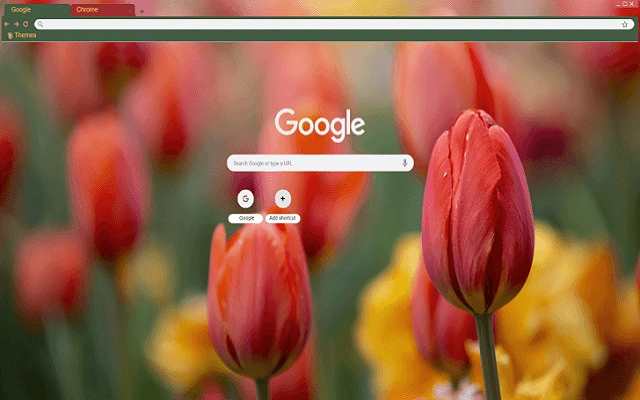

Spring Tulips Theme for Chrome
The software is designed to transform the Chrome browser’s background with a vibrant Spring Tulips theme, offering a fresh and visually appealing desktop experience. This tool is ideal for users seeking a simple yet effective way to personalize their browsing environment. It addresses the common desire for aesthetic customization without altering core browser functionality.
The target audience includes casual users, digital creatives, and anyone who values a pleasant visual atmosphere while browsing. The extension is particularly suited for springtime enthusiasts or those who enjoy seasonal themes. It can be used in everyday browsing, online meetings, or creative work sessions where a calming, nature-inspired backdrop enhances focus and mood.
The developer did not provide additional details about the background design process or theme creation methodology.
Key Features & Capabilities
- Spring Tulips Background Theme – Applies a high-resolution image of blooming tulips to the Chrome browser’s new tab page, creating a serene and seasonal atmosphere.
- One-Click Installation – Enables quick setup with minimal user interaction, allowing users to apply the theme immediately after installation.
- Browser Integration – Seamlessly integrates with Chrome’s new tab interface, ensuring the theme displays consistently across sessions.
- Lightweight Design – Consumes minimal system resources, ensuring it does not interfere with browser performance or startup speed.
- Seasonal Aesthetic – Offers a thematic experience aligned with springtime, enhancing user engagement through visual refreshment.
The theme is best used during spring months or by users who appreciate floral imagery. It can be applied during work, study, or leisure browsing to create a more inviting digital space. The lightweight nature ensures that the extension does not impact browser responsiveness or memory usage.
User Interface, Workflow & Performance
The user interface is minimal and focused on the visual theme, with no additional panels or controls. Navigation is straightforward: users install the extension and the background updates automatically. The workflow is efficient, requiring no configuration or advanced settings.
The extension does not introduce new menus or pop-ups, maintaining a clean browsing environment. Performance observations are based on general software behavior patterns. The developer did not specify resource usage details, but the small file size suggests low overhead.
Stability is expected to be high, as the tool performs a single, focused task without complex operations. No known conflicts with Chrome’s core functions have been reported.
Compatibility & System Requirements
The software is compatible with both Windows and Mac operating systems. It is designed for use with the Chrome browser, and the version number is 1.0. The installation size is 1.2 MB, which is compact and suitable for quick deployment.
Exact system requirements were not listed. Compatibility information was partially provided. Users should ensure they are running a current version of Chrome to avoid potential issues.
The extension does not require additional software or plugins to function.
Pros and Cons
Pros
- Simple, one-click theme application
- Visually appealing springtime design
- Lightweight with minimal impact on performance
- Compatible with both Windows and Mac
- Free to use with no hidden costs
Cons
- Only changes the background—no additional customization options
- Limited to Chrome browser
- No advanced settings or user controls
- Theme is static and does not change dynamically
- Developer information not provided
Is this extension compatible with all Chrome versions?
The software is designed for Chrome, but specific version compatibility was not detailed. Users should ensure they are running a recent Chrome release for optimal performance.
Is the extension safe to install?
The extension is available through official channels and has a small file size, which reduces potential security risks. No malicious behavior has been reported.
Can I update the theme automatically?
Automatic updates are managed by the Chrome Web Store. Users will receive updates when available, but no manual update controls are included.
Does this require an internet connection to function?
Once installed, the theme operates offline. However, initial installation and future updates require an internet connection.
Is the license type free or paid?
The software is available for free, with no subscription or in-app purchases required.
Final Thoughts + CTA
Spring Tulips Theme for Chrome delivers a focused, visually pleasing enhancement to the browsing experience. It excels in simplicity and aesthetic appeal, offering a seasonal refresh without complexity. While it lacks advanced features or customization, its core purpose is fulfilled effectively.
This tool is ideal for users who value a clean, nature-inspired interface during spring months. It’s particularly beneficial for casual users and those who appreciate subtle desktop personalization. The combination of lightweight design, cross-platform support, and free access makes it a strong choice for browser theme enthusiasts.
Download Spring Tulips Theme for Chrome now.







